오늘은 학습하여 생성된 h5모델을 tflite로 변환하여 안드로이드에 적용하는 방법을 기록해보겠다!
지금 연구실을 하면서 훈련한 딥러닝 모델을 안드로이드에서 실시간으로 적용시키는 프로젝트를 진행 중이다.
나는 참고로 LSTM + TCN으로 훈련한 모델을 tflite 모델로 변환시켜 안드로이드에 적용하였다.
Step 1
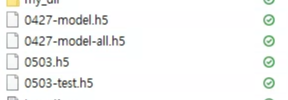
- Train을 하여 생성된 h5 모델을 원하는 폴더 위치에 옮긴다.
Step 2
- 해당 h5모델을 tflite 모델로 변환시킨다.
import tensorflow as tf
from keras.models import load_model
from tcn import TCN

model = load_model("h5모델이름.h5", custom_objects={"TCN":TCN})
converter = tf.lite.TFLiteConverter.from_keras_model(model)
tfmodel = converter.convert()
open("./tflite_이름.tflite", "wb") .write(tfmodel)
print("success")
Step 3
- 나는 변환된 tflite 모델을 test해보는 코드를 해보았다. 적용시키기 전에 확인해보는 것이 좋다.
Step 4
- 해당 tflite 모델을 안드로이드 프로젝트 assets 폴더에 위치시킨다.

Step 4
- Interpreter 클래스 타입의 tflite 변수를 선언한다.
public Interpreter tflite;- modelPath로 전달된 경로에 있는 모델을 불러와서 Interpreter 객체를 생성하여 반환한다.
private Interpreter getTfliteInterpreter(String modelPath) {
    try {
         return new Interpreter(loadModelFile(getActivity(), modelPath));
    }
    catch (Exception e) {
        e.printStackTrace();
    }
    return null;
}
- tflite 변수에 해당 모델을 할당한다.
tflite = getTfliteInterpreter("tflite_이름.tflite");- tflite 객체의 run 메소드를 호출하여 모델을 실행한다.
tflite.run(features, outputs);
'🙋♀️ Android' 카테고리의 다른 글
| [Android] 네이버 지도 API 연동 (0) | 2024.04.24 |
|---|---|
| [Android] 데이터 바인딩 DataBinding (0) | 2024.04.24 |
| [Android] Firebase Realtime Database 리스트뷰에 실시간 출력하기 (0) | 2023.05.23 |
| [Android] QR통해 firebase Realtime Database 저장 구현 ,QR_reader기 (0) | 2023.05.08 |
| [Android] firebase SMS 인증 기능, qr코드 생성 (1) | 2023.05.08 |